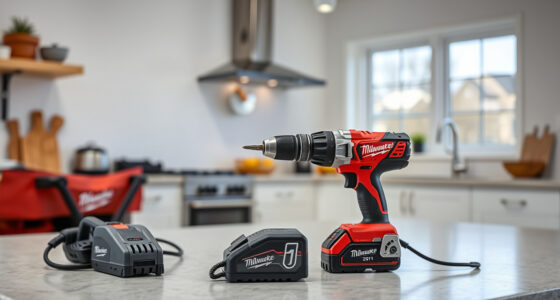
If your Milwaukee power tool’s charger keeps blinking red, it can be frustrating and halt your work. This blinking indicator typically signals a problem with the battery, charger, or connection. Fortunately, many issues are simple to diagnose and resolve with the right approach. In this guide, we’ll walk through practical, step-by-step troubleshooting methods to help you get your tools back to work quickly and safely.

Get business pricing on tools and workshop supplies
- Business-only prices and quantity discounts
- Tax-exempt purchasing
- Multiple users, one account, clear invoices
Whether you’re dealing with a new battery, an old charger, or a connection issue, these steps are designed to be clear, safe, and effective. Always prioritize safety and ensure your work area is dry and free of hazards when working with power tools and chargers.
Key Takeaways
| Battery issues | A blinking red light often indicates a battery problem, such as poor contact or needing a charge. |
| Charger status | The charger may be malfunctioning or incompatible, requiring inspection and testing. |
| Connection checks | Ensure the battery and charger contacts are clean and properly connected. |
| Safety first | Always unplug and handle batteries carefully during troubleshooting to avoid injury. |
Step 1: Check the Battery Condition
- Remove the battery from the charger and inspect it visually for any damage, swelling, or corrosion on the contacts.
- If the battery appears damaged or swollen, replace it immediately.
- Clean the battery contacts with a dry cloth to remove dirt, dust, or debris that might interfere with proper connection.
- Try inserting the battery back into the charger securely, ensuring it clicks into place.
Step 2: Test the Charger
- Unplug the charger from the power source and inspect for any visible damage or debris in the port.
- Use a different power outlet to rule out electrical issues.
- If your charger has indicator lights, note their behavior when plugged in without a battery.
- Try charging a different compatible Milwaukee battery to see if the charger functions correctly.
Step 3: Confirm Proper Connection
- Ensure that the battery’s contact points align correctly with the charger.
- Wipe the contacts with a dry cloth or a mild alcohol wipe to remove any dirt or oxidation.
- Re-insert the battery firmly, making sure it is seated correctly.
Step 4: Reset and Test
- Unplug the charger from the power outlet.
- Remove the battery and wait for 10-15 seconds.
- Reconnect the battery, then plug the charger back in and observe the blinking light.
- If the blinking persists, try charging a different battery if available.
Step 5: Consider Battery and Charger Compatibility
If you’ve tried all steps above and the charger still blinks red, verify that the battery and charger are compatible and not damaged beyond repair. Sometimes, using incompatible batteries or chargers can cause improper charging signals.
If your batteries are old or heavily used, consider replacing them with new Milwaukee-compatible batteries, such as the Milwaukee 48-11-1850R 5.0 Ah XC Resistant Battery or the Milwaukee M18 REDLITHIUM HIGH Output XC 6.0Ah Battery Pack for extended, reliable power.
Tips and Warnings
- Always wear safety glasses and gloves when handling batteries and chargers.
- Never attempt to disassemble or repair the charger or battery yourself.
- If the charger or battery shows signs of damage, stop using it immediately and seek professional repair or replacement.
- Keep the charger and batteries away from water, extreme heat, and metal objects that could cause short circuits.
The Products in This Guide

Milwaukee M18 18V Cordless Power Tool Combo Kit
- ✔ Tool type: Cordless
- ✔ Battery type: Lithium-ion
- ✔ Warranty: Standard manufacturer warranty

Milwaukee Shockwave 100pcs Impact Driver Bit Set Packout
- ✔ Length: Varies
- ✔ Impact rated: Yes
- ✔ Packout case: Included
Milwaukee M18 18V Cordless Power Tool Combo Kit
The Milwaukee M18 18V Cordless Power Tool Combo Kit offers a complete set of high-performance tools with long-lasting batteries and a rapid charger. It’s designed for professional and DIY use, providing versatility and durability in demanding environments.
Pros:
- Includes 8 tools for versatile tasks
- Comes with 3 batteries for extended work time
- Rapid charger minimizes downtime
- Heavy-duty storage bags included
Cons:
- Initial cost may be high for some users
- Tools can be heavy for prolonged use
Best for: Construction, remodeling, and maintenance professionals needing reliable power tools.
Not ideal for: Light-duty or occasional users may find the full kit excessive.
Bottom line: A versatile, durable power tool kit ideal for professional and serious DIY projects.
Milwaukee Shockwave 100pcs Impact Driver Bit Set Packout
The Milwaukee Shockwave 100pcs Impact Driver Bit Set Packout provides a wide variety of bits designed for durability and performance with M18 tools. It’s a practical addition to any toolbox to enhance your productivity.
Pros:
- High-quality impact bits
- Packout case for organized storage
- Compatible with Milwaukee impact drivers
- Durable construction
Cons:
- Set may be too extensive for casual users
- Bits can wear out with heavy use
Best for: Professional contractors and serious DIYers needing a comprehensive impact bit set.
Not ideal for: Occasional users may prefer smaller, simpler sets.
Bottom line: A comprehensive, durable impact driver bit set ideal for demanding jobs.
Frequently Asked Questions
Why is my Milwaukee charger blinking red?
A blinking red light usually indicates a battery or charger issue, such as poor contact, overheating, or a faulty battery. Follow the troubleshooting steps to identify the cause.
Can I use any battery with my Milwaukee charger?
No, only Milwaukee-compatible batteries designed for your specific M18 system should be used to ensure proper charging and safety.
What should I do if my batteries won’t charge?
Check for damage, clean the contacts, try different batteries and outlets, and ensure compatibility. If issues persist, consider replacing the batteries or charger.
Is it safe to open the charger or battery?
No, opening chargers or batteries can be dangerous and void warranties. Seek professional repair if needed.
How often should I replace my batteries?
Battery lifespan varies with usage, but most Milwaukee lithium-ion batteries last for several years with proper care. Replace if they no longer hold a charge or show physical damage.
Getting Your Milwaukee Tools Back in Action
Dealing with a blinking red charger light can be straightforward once you follow the proper troubleshooting steps. Always start with inspecting and cleaning the battery and contacts, then verify the charger’s function with different batteries and outlets. Remember, safety is paramount—never attempt repairs beyond cleaning and testing. With patience and careful inspection, you can usually resolve the issue quickly and get back to your work with minimal downtime.
If problems persist, consider replacing worn or damaged batteries and ensuring all components are compatible. Proper maintenance and attentive inspection will extend the lifespan of your Milwaukee tools and keep your workflow running smoothly.
Affiliate disclosure: As an Amazon Associate we earn from qualifying purchases. Prices and availability are accurate as of the time of publishing.
Fall Picks
fall essentials
As an affiliate, we earn on qualifying purchases.